Record any call. Notes write themselves.
Quill records Zoom, Meet, Teams, FaceTime and browser calls from your Mac, with no bot joining. It keeps your voice and theirs on separate tracks, writes the transcript on your Mac, and turns it into a summary, a to-do list with who owes what by when, and a follow-up email.
Pay once · macOS 14+ · Apple silicon & Intel · No meeting bot · Works offline · Already bought? Download Quill
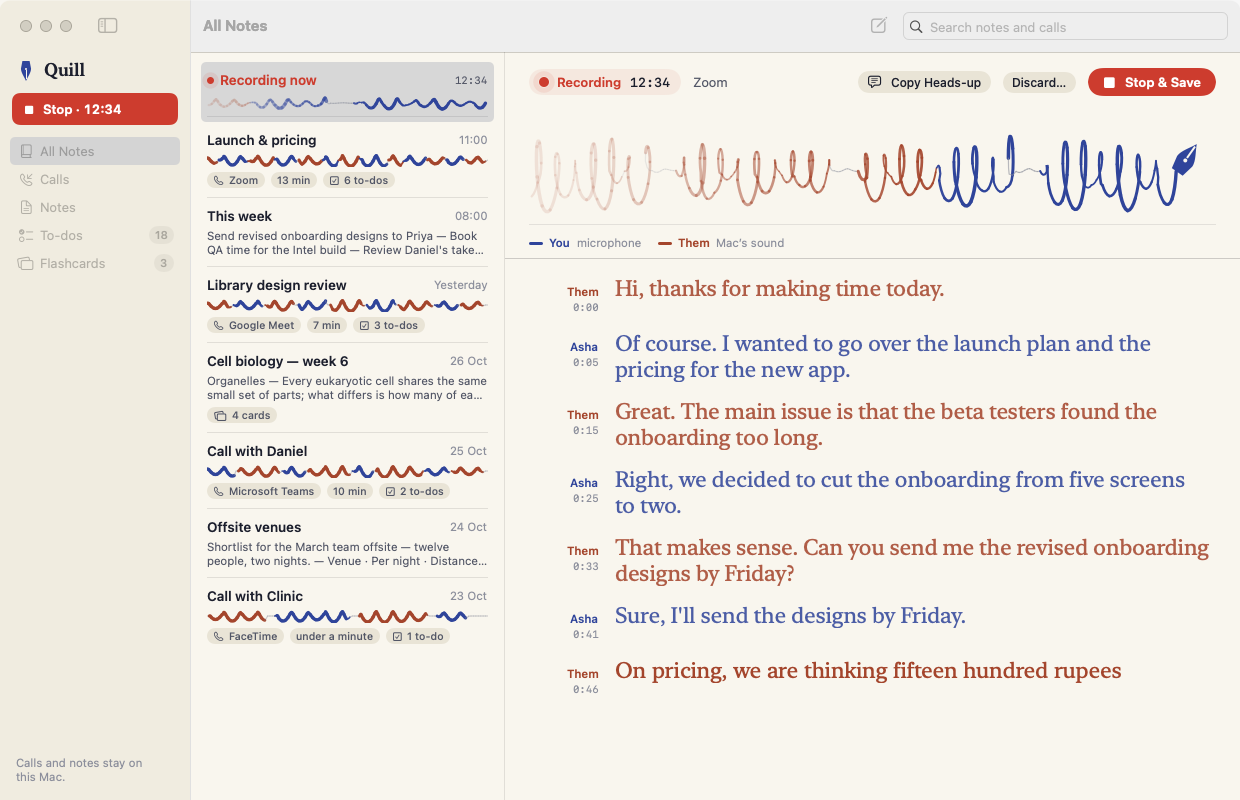
A working model, not a video. The call is scripted text, with sample notes. Nothing is recorded: the page never asks for your microphone, and nothing leaves this tab.
- Pay once, no subscription
- No bot joins your call
- Transcribed on your Mac
- AI summaries off by default
- Native on Apple silicon & Intel
- 14-day refund
No bot in the room. Two inks on the page.
Quill listens where you do: your microphone, and your Mac’s sound. So it works with any app that makes a call, and the other people only ever see you.
Your mic and the call audio stay on separate tracks, so the transcript knows what you said and what they said without guessing voices. Without headphones, your mic also hears them; Quill drops that echo. Start from the window, the menu bar, or ⌃⌥⌘R from any app. Several people on the other side all appear as “Them”, and you can give them a name.
ZoomGoogle MeetMicrosoft TeamsFaceTimeSlackCalls in your browser
Asha Sure, I’ll send the designs by Friday.
Priya Agreed. I’ll update the pricing page tomorrow.
Ask first. Quill helps.
Many places require everyone on a call to agree before it’s recorded. The first time you record, Quill says so and hands you a heads-up message to paste into the chat, in the tone you like.
- While Quill records, its menu-bar icon turns red and a small pill shows the time. Always.
- Quill never starts recording on its own. You press Record, every time.
- Turn on “Remind me before every recording” if you want the reminder each call.
From hello to follow-up.
Everything after the call is written for you: on your Mac, in a calm notebook, ready to share.
No bot, any app
Records the call from your Mac’s sound, so it works with Zoom, Meet, Teams, FaceTime, Slack and browser calls, and nobody sees a recorder join.
You and Them, never mixed up
Your mic and the call audio are separate tracks, so the transcript knows who spoke without guessing voices. It also drops speaker echo when you aren’t wearing headphones.
Watch the ink write
While you record, a pen writes a line in two inks, blue-black for you and red-brown for them, and the transcript appears as people speak.
On-device transcript
Apple’s speech recognition runs on your Mac, with no upload. Click any line to replay that moment.
Summary, to-dos and email, offline
Quill picks out the key points, finds “I’ll…”, “can you…” and “let’s…” commitments with their deadlines, and drafts the follow-up email. No internet needed.
Your own AI, if you want it
Off by default. Turn it on to summarise with Claude (Haiku 5.5 to start) or any OpenAI-compatible server, including Ollama or LM Studio on your Mac. Your key goes in the Keychain, and Quill tells you plainly what is sent, and where.
A real notes editor
Headings, to-dos, lists, quotes, tables and flashcards, with Markdown shortcuts: #, [], - and question :: answer.
Every to-do in one place
Open to-dos from every call and note are collected in one list, with the soonest due first.
Flashcards that come back on time
Study any note’s cards with spaced repetition: Again, Good or Easy, and each card returns when it’s due.
Export anywhere
Markdown, PDF, RTF or Word (.docx), with the transcript and email included. Save the call as a stereo recording too: you on the left, them on the right.
Comparing meeting recorders? Read the guide: the best meeting recorder apps for Mac
Off by default. Plain about what’s sent.
Quill’s own summary, to-dos and email are made on your Mac for every call, with no network. If you want a model to rewrite and reason, you can bring your own.
Turn on AI summaries in Settings and paste your key (it’s kept in your Mac’s Keychain). Then, when you press Summarise on a call, that call’s full transcript, with the names you’ve added, is sent to the provider you picked and handled under their terms. Audio is never sent. Choose a server on your own Mac, like Ollama or LM Studio, and the transcript never leaves your Mac at all.
Audio is never sent to anyone. Recordings stay on your Mac.
Every screen, light and dark.
Screenshots straight from Quill, with sample calls and notes. Flip between light and dark.


What stays. What connects.
Recording, transcription and Quill’s own summaries all happen on your Mac.
Stays on your Mac
Your calls, and everything Quill writes from them.
- ✓RecordingsYour mic and the call as two tracks, in Quill’s folder
- ✓TranscriptsWritten by Apple’s on-device speech recognition
- ✓Notes, summaries, to-dos, emailsQuill’s own summaries need no network
- ✓How you use itNo analytics or tracking in the app
Connects
Small requests over HTTPS, plus one you can choose.
- 1License checkYour key and an activation ID, to Dodo Payments
- 2Update checkApp name and version, to
quill.newmac.app - 3AI summary, only if you turn it onWhen you press Summarise: that call’s transcript, to the provider you chose, with your key. Never audio.
The full list, for every app, is in the privacy policy.
Pay once. Keep it.
One payment, no subscription. Choose how many Macs you’ll use Quill on.
3 Macs
For your home and work Macs
Checkout opens soon. The buttons above go live here the moment it does.
Every plan includes
- One payment, no subscriptionEvery feature, yours to keep.
- License key by emailSent the moment you pay. Activate in one click.
- Move between MacsUse “Deactivate this Mac”, then activate on the new one.
- Free updatesNew versions install themselves.
- 14-day refundNot for you? Read the refund policy.
- macOS 14 or laterNative on Apple silicon & Intel.
Already bought? Download Quill · .zip · Install help
Questions, answered.
Does a bot join my meeting?
No. Quill records your Mac’s sound output and your microphone, so the other people only see you.
Is it legal to record calls?
Laws vary by country and state, and many places require everyone’s consent. Quill reminds you to tell people and gives you a heads-up message to paste into the chat. While it records, a red menu-bar icon and a small timer are always visible, and Quill never starts recording on its own.
Does anything leave my Mac?
Not by default. Recordings, transcripts, notes and Quill’s own summaries stay in a folder on your Mac. Only if you turn on AI summaries and press Summarise is that call’s transcript sent to the provider you chose, using your key. Audio is never sent. Apart from that, Quill only checks your license and looks for updates — see the privacy policy.
What does Quill need?
macOS 14 Sonoma or later, on Apple silicon or Intel. The first time you record it asks for three permissions: Microphone, for your side of the call; Screen & System Audio Recording, for their side (that’s how macOS labels system-audio capture — Quill captures sound only, never your screen); and Speech Recognition, for the on-device transcript.
Which languages work?
Any language Apple can recognise entirely on your Mac. Settings lists exactly which ones are available on your machine.
How good is the free, offline summary?
It is extractive: it picks the sentences that carry the call and finds clear commitments and dates. It is fast, private and good at to-dos, but it doesn’t rewrite or reason the way an AI model does. Turn on AI summaries if you want that.
Can I transcribe a recording I already have?
Yes. Use File › Import Recording. A single-track file can’t separate voices, so everyone in it is labelled as one speaker.
What doesn’t Quill do?
It has no screen-watching assistant, dictation, calendar integration or meeting bot. It also can’t tell apart several people on the other side of the call: they all appear as “Them”, and you can give them a name.
macOS says it can’t verify the developer.
Quill is distributed directly from this website instead of the App Store, so macOS asks you to confirm the first time. Here’s how to open it.
Is there a free trial?
No. Use the working model at the top of this page to see exactly how Quill works. If it turns out not to be for you, you can ask for a refund within 14 days — see the refund policy.
Can I use Quill on more than one Mac?
Yes. The 3-Mac and 5-Mac plans cover several Macs with one license key. Any license can move to a new Mac: choose “Deactivate this Mac” in Quill on the old one, then activate on the new one.

Talk freely. Quill takes the notes.
No bot, no upload, no subscription. Tell people you’re recording, press Record, and the summary is waiting when you hang up.